RoboDK Product
Member Since 2018
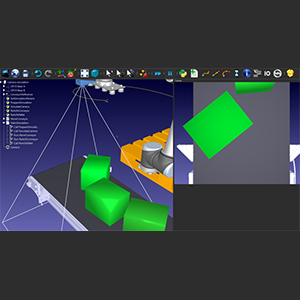
RoboDK is a powerful and cost-effective simulator for industrial robots and robot programming. Simulate over 1400 robot arms from 80 different robot manufacturers! No programming skills are required with the intuitive RoboDK graphical interface. Learn more https://robodk.com/
Product filed under:
Embedded Vision Processors / Compact Vision Systems, End of Arm Tooling, and Grippers Embedded Vision Processors / Compact Vision Systems, End of Arm Tooling, Grippers, Industrial, Motors & Drives, Power Transmission, Actuators & Mechanics, Robots, and Software & AI
See More
RoboDK simulation software allows you to get the most out of your industrial robot. Program any industrial robot with the same simulation environment.
Easily simulate any robot arm offline, on your PC and deploy robot programs on the robot with just a few clicks. RoboDK’s simulation and offline programming tools allow you to program robots outside the production environment, eliminating production downtime caused by shop floor programming.
No programming skills are required with the intuitive RoboDK graphical interface. You can easily program any robot in a few steps from your computer. The following guide will show you how to program your robot offline in a few minutes for a painting or inspection application:
https://robodk.com/doc/en/Getting-Started.html
More advanced users can program the robot using the RoboDK API. The RoboDK API allows programming the UR robot using your preferred programming language. The RoboDK API is available in Python, C#, Visual Basic, C++ and Matlab. Furthermore, it is very easy to automate repetitive tasks and integrate the 3D simulation environment with your projects:
https://robodk.com/doc/en/RoboDK-API.html
FEATURES AND BENEFITS
- Intuitive graphical user interface - Program your robot with no coding required
- Drag-and-drop functionality - Set up your cell in minutes (tools, environment)
- Extensive library - Broad range of robots, tools, actuators and sensors for your project
- Supported 3D models - Import objects and create new tools using 3D files such as STL, STEP and IGES
- External axes - Integrate external axes to extend your robot’s reachability
- Generate Programs – Obtain .URP and .SCRIPT programs with just a few clicks
- Run programs on the fly – Execute programs directly from your computer with just a few clicks
- Real time monitoring – View the robot state on your computer screen
- CAM for robots - easily convert 5-axis CNC toolpaths to robot programs and use your robot like a 5-axis CNC
- Automated path solving - Avoids robot errors including singularities, joint limits, reach limits, and collisions
- Fast collision detection - Easily define the object interactions that you want to avoid.
- Advanced use - Create robot programs from your PC using your favorite programming language. The RoboDK API is available in Python, C#, Visual Basic, C++ and Matlab
- Simulate 2D vision cameras - Test your image recognition algorithms in the simulation environment.
- Multiple robot simulation - Synchronize and program multiple robots moving them at the same time without any limitations.
- Easily customize your post processor - Integrate specific sensors or actuators such as grippers, force control, image processing, etc.
HOW DOES IT WORK?
Download RoboDK, simulate and program robots in just a few minutes:
- Download and install RoboDK:
https://robodk.com/download - Create a simulation.
https://robodk.com/doc/en/Getting-Started.html - Program your robot.
Generate a URP, SCRIPT or run the program directly from your PC with just a few clicks
https://robodk.com/doc/en/Robots-Universal-Robots.html
The download is a 30-day trial and it includes all simulation and offline programming features.
Licenses can be purchased online:
https://robodk.com/pricing
Educational pricing is available for Schools and Universities.
Other Products from RoboDK
.png)
RoboDK CAM
Robotic machining represents the future of flexible manufacturing, but its success hinges on moving away from the "trial and error"