
What Is USB3 Vision?
USB3 Vision is an interface standard for industrial cameras that defines how vision systems transmit image data over USB 3.0 connections, enabling high-bandwidth video transfer with plug-and-play convenience. Developed by the Automated Imaging Association (AIA, now part of A3 - Association for Advancing Automation) and released in 2013, the standard leverages USB 3.0's 5 Gbps theoretical bandwidth to deliver sustained image data rates of 350-400 MB/s.
The standard specifies the communication protocol between USB3 cameras and host computers, ensuring cameras from different manufacturers work seamlessly with vision software applications. Like its counterpart GigE Vision for Ethernet cameras, USB3 Vision uses GenICam to provide a standardized way to describe camera features, enabling consistent camera control regardless of manufacturer.
USB3 Vision cameras combine high bandwidth with true plug-and-play operation. Connect a camera to any USB 3.0 port and the system recognizes it immediately without driver installation or network configuration. This simplicity makes USB3 Vision popular for compact inspection systems, laboratory applications, and OEM equipment where minimizing setup complexity is critical.
How Does USB3 Vision Achieve High Bandwidth?
USB3 Vision achieves high bandwidth through USB 3.0's improved physical layer providing 5 Gbps raw throughput, bulk transfer mode optimized for large data packets, and efficient protocol overhead that delivers 350-400 MB/s sustained image data transfer.
USB 3.0 SuperSpeed Architecture
USB 3.0 introduced SuperSpeed mode with dedicated transmit and receive lanes operating simultaneously, fundamentally different from USB 2.0's half-duplex communication. This bidirectional architecture enables cameras to stream image data to the host while simultaneously receiving control commands without bandwidth sharing. The physical layer uses 8b/10b encoding where 8 data bits require 10 transmitted bits for clock recovery and error detection, reducing effective bandwidth from 5 Gbps to 4 Gbps (500 MB/s).
USB3 Vision's implementation achieves 350-400 MB/s sustained throughput accounting for protocol overhead, control messages, and practical system limitations. This bandwidth supports:
- 5-megapixel monochrome sensors at 70 fps (350 MB/s)
- 2-megapixel color sensors at 85 fps (408 MB/s with Bayer pattern)
- 12-megapixel monochrome sensors at 30 fps (360 MB/s)
Asynchronous Bulk Transfers
USB3 Vision uses bulk transfer mode designed for large data transfers without guaranteed latency but with error checking ensuring data integrity. Unlike isochronous transfers (used for audio/video with guaranteed bandwidth but no error correction), bulk transfers retry failed packets automatically. This suits machine vision applications where frame accuracy matters more than real-time delivery guarantees.
The asynchronous nature means camera timing is independent of host polling. Cameras generate frames based on triggers or free-running frame rates, buffering data until the host retrieves it. This simplifies camera firmware and allows flexible triggering mechanisms.
Host Controller Requirements
USB3 Vision performance depends critically on host controller implementation. Each USB 3.0 controller supports multiple cameras sharing available bandwidth, but practical limitations arise from controller design and PCIe bus bandwidth. Key considerations include:
- Dedicated controller per camera - Optimal performance uses one USB 3.0 port per camera, avoiding bandwidth sharing
- PCIe Gen 2 or better - Controller requires adequate PCIe bandwidth to transfer data from USB to system memory
- Driver and chipset compatibility - Some controller chipsets show better performance than others with vision applications
Industrial computers designed for vision applications typically provide 4-6 independent USB 3.0 controllers enabling reliable multi-camera systems.
What Are Host Controller Requirements?
USB3 Vision requires a dedicated USB 3.0 host controller per camera for optimal performance, with the controller providing 5 Gbps bandwidth, adequate buffer memory, and compatible drivers that maintain sustained data transfer without frame drops.
USB Controller Architecture
Standard USB 3.0 controllers (called xHCI - eXtensible Host Controller Interface) manage multiple USB ports, typically 2-4 ports per controller. While the USB 3.0 specification allows multiple devices sharing a controller, vision applications benefit from dedicating one camera per controller to avoid bandwidth contention. A system with four cameras ideally uses four separate USB 3.0 controllers, each handling one camera's data stream.
Controllers connect to the system via PCIe (PCI Express) lanes. A PCIe Gen 2 x1 lane provides ~500 MB/s bidirectional bandwidth, adequate for one USB3 Vision camera. Controllers with PCIe x4 or x8 connections handle multiple cameras simultaneously. Checking the physical PCIe slot and lane configuration ensures the controller has adequate system bandwidth beyond just USB port count.
CPU Usage Considerations
USB3 Vision transfers require moderate CPU intervention for data movement from USB controller to application memory. Typical CPU utilization is 1-3% per camera on modern multi-core processors. This compares favorably to GigE Vision cameras which may consume 5-8% CPU per camera due to network protocol overhead. For multi-camera systems, USB3 Vision's lower CPU usage enables more cameras per computer or leaves processing capacity for image analysis algorithms.
Industrial vs Consumer Host Controllers
Consumer laptop and desktop USB 3.0 implementations sometimes exhibit compatibility issues with vision cameras due to aggressive power management, inconsistent timing, or chipset-specific quirks. Industrial computers designed for vision applications use tested controller chipsets with stable drivers and disabled power-saving features that might interrupt camera streaming.
Recommended practices include:
- Intel chipset controllers - Widely tested and documented compatibility
- Renesas (formerly NEC) controllers - Common in industrial systems with good vision camera support
- Disable USB selective suspend - Prevents power management from interrupting streams
- Update to latest drivers - Controller manufacturers release vision-specific fixes
Cable Length and Quality
USB 3.0 specification limits cable length to 3 meters for copper cables, though 5-meter cables often work reliably with USB3 Vision cameras. Active USB 3.0 cables with signal conditioning extend this to 10-15 meters but add cost and potential failure points. For applications requiring longer distances, fiber optic USB 3.0 extenders reach 50-100 meters at the cost of additional hardware and complexity.
Cable quality matters significantly. Inexpensive USB 3.0 cables may lack proper shielding or have inadequate conductor gauge for reliable vision data streaming. Using USB 3.0 certified cables or industrial-grade cables designed for vision applications prevents intermittent connection issues and data errors.
How Does USB3 Vision Compare to GigE Vision?
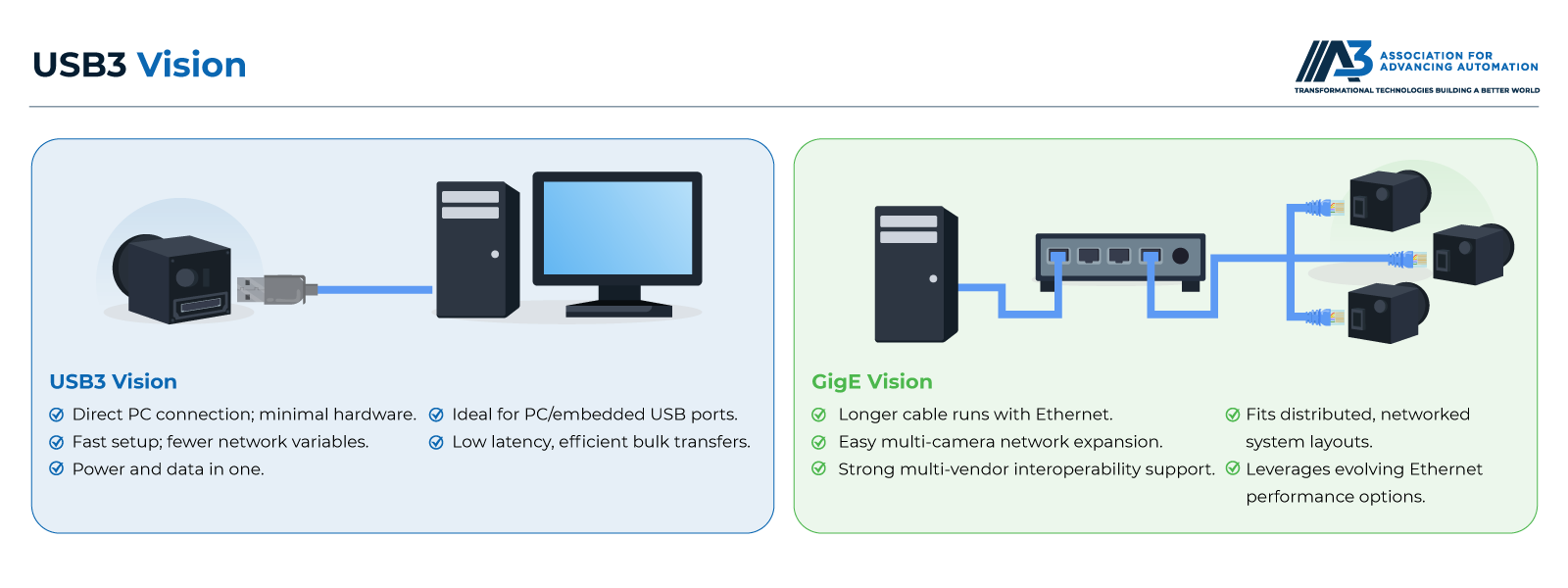
USB3 Vision provides higher bandwidth and simpler setup than GigE Vision but limits cable length to 5 meters and requires dedicated host controllers for multiple cameras, while GigE Vision supports longer distances, easier multi-camera scaling, and network infrastructure integration.
USB3 Vision vs GigE Vision: Feature Comparison
| Feature | USB3 Vision | GigE Vision |
|---|---|---|
| Bandwidth | 350-400 MB/s sustained | 110 MB/s (1 GigE), 1,200 MB/s (10 GigE) |
| Cable Length | 5m standard, 15-25m with active cables | 100m copper, 500+ km fiber optic |
| Setup Complexity | Plug-and-play, no configuration | Requires IP address assignment, network setup |
| CPU Usage | ~1% at 85 MB/s | ~6% at 85 MB/s per camera |
| Multi-Camera | Requires dedicated controller per camera | Multiple cameras share network switches |
| Power Delivery | Up to 4.5W per camera via cable | Requires separate power or PoE |
| Installation Cost | Low (uses computer USB ports or inexpensive PCIe cards) | Higher (network cards, switches, cabling) |
| Scalability | Limited (PCIe slot availability) | Excellent (add cameras to the network) |
| Synchronization | Hardware trigger via GPIO | IEEE 1588 PTP for network-wide sync |
| Best Applications | Compact systems, 1-3 cameras, close proximity | Distributed systems, 4+ cameras, long distances |
Bandwidth Comparison
USB3 Vision delivers 350-400 MB/s per camera, exceeding standard GigE Vision's 110 MB/s by over 3x. This advantage enables higher resolution sensors, faster frame rates, or both. A 5-megapixel camera running at 75 fps requires 375 MB/s (assuming 8-bit monochrome), feasible with USB3 Vision but impossible with 1 GigE.
However, 10 GigE Vision provides 1,200 MB/s bandwidth, surpassing USB3 Vision and supporting extremely high-resolution or high-speed applications. The trade-off is cost, with 10 GigE infrastructure significantly more expensive than USB3 Vision.
For typical machine vision applications using 2-5 megapixel cameras at 20-60 fps, USB3 Vision provides ample bandwidth at lower cost and complexity than 10 GigE while exceeding 1 GigE capabilities.
Cable Length and Topology
GigE Vision's 100-meter copper cable length suits industrial environments where cameras mount on large machines or production lines distant from control computers. USB3 Vision's 5-meter practical limit restricts it to compact inspection stations, laboratory setups, or robot-mounted cameras. The topology difference is equally significant. GigE Vision uses switched networks where one network card handles many cameras. USB3 Vision requires dedicated controllers, potentially filling all available USB ports with 3-4 cameras and limiting expansion.
Multi-Camera Scaling
USB3 Vision requires one dedicated USB 3.0 host controller per camera for full bandwidth. A four-camera system needs four PCIe USB 3.0 cards, consuming four PCIe slots. Industrial computers may not have sufficient expansion slots for large camera arrays.
GigE Vision cameras share network infrastructure. Connect multiple cameras to a Gigabit switch, then one network connection to the host computer. Adding cameras requires only switch ports, not additional computer expansion slots. Eight cameras share one 10 GigE network connection to the host.
For 1-3 camera systems, USB3 Vision's dedicated bandwidth per camera and low setup complexity provide advantages. For 4+ camera systems, GigE Vision's network-based architecture scales more easily and cost-effectively.
CPU Utilization
USB3 Vision cameras show approximately 1% CPU usage per camera at 85 MB/s transfer rates, significantly lower than GigE Vision's 6% CPU usage at the same data rate. This efficiency advantage comes from USB's DMA (Direct Memory Access) capability, moving data directly to application memory without CPU involvement.
Lower CPU usage benefits systems with intensive image processing or those running multiple applications simultaneously. A system capturing from three cameras and performing real-time defect detection has more CPU available for processing with USB3 Vision than GigE Vision.
The CPU usage advantage diminishes in multi-camera systems where GigE Vision's network aggregation efficiency provides competitive performance once you're managing many cameras through a single network interface.
When Is USB3 Vision the Best Choice?
USB3 Vision excels for compact vision systems with 1-3 cameras within 5 meters of the host computer, applications requiring high bandwidth for resolution or frame rate, and environments where plug-and-play simplicity and minimal setup time are priorities.
Compact Inspection Systems
Machine builders integrating vision into compact equipment benefit from USB3 Vision's simplicity. A small inspection station with one or two cameras mounted within arms-reach of the control PC needs only USB cables, no network infrastructure or IP configuration.
The plug-and-play nature speeds commissioning. Connect cameras, launch vision software, and start acquiring images immediately. For OEM equipment builders deploying systems at customer sites, this simplified startup reduces installation time and technical support requirements.
Laboratory and R&D Applications
Research environments with frequently changing camera configurations favor USB3 Vision. Moving cameras between setups, swapping different camera models, or temporarily adding cameras for experiments requires no network reconfiguration, just plug in and start capturing.
The high bandwidth supports scientific imaging applications requiring large sensor formats or high frame rates for motion analysis. USB3 Vision's 400 MB/s enables 12-megapixel cameras at 25+ fps, suitable for many research applications without the expense of 10 GigE infrastructure.
Cost-Sensitive Deployments
Small to medium projects with limited budgets benefit from USB3 Vision's lower infrastructure costs. No network switches, managed network gear, or specialized network interface cards are required. Most computers already include USB 3.0 ports, and inexpensive PCIe cards add capacity for additional cameras.
The simplified setup reduces engineering time. For projects where vision is an enhancement rather than the core function, USB3 Vision minimizes the learning curve and deployment complexity, allowing teams without network engineering expertise to successfully implement vision systems.
When to Choose GigE Vision Instead
Choose GigE Vision when cameras must be located more than 5 meters from the host, when deploying 4+ cameras, when integrating with existing network infrastructure, or when future expansion might require additional cameras. GigE Vision's network architecture provides flexibility and scalability that USB3 Vision's point-to-point topology cannot match.
Applications in harsh industrial environments also favor GigE Vision since Cat6 cables with shielding resist electromagnetic interference better than USB cables. The industrial Ethernet ecosystem provides ruggedized connectors, robust cables, and extensive field-proven infrastructure for demanding conditions.
Conclusion
USB3 Vision delivers high-bandwidth image transfer (350-400 MB/s) with plug-and-play simplicity, making it ideal for compact machine vision systems with 1-3 cameras located close to host computers. The standard combines superior bandwidth compared to 1 GigE Vision with significantly lower CPU utilization and simplified setup.
The choice between USB3 Vision and GigE Vision depends primarily on cable distance requirements, number of cameras, and system architecture preferences. USB3 Vision excels for straightforward, high-performance applications where cameras remain within 5 meters of the host. GigE Vision provides better scalability, longer distances, and more flexible system architectures for complex installations.
Understanding the strengths and limitations of each standard enables appropriate selection based on application requirements, ensuring optimal performance and cost-effectiveness for machine vision implementations.
Recommended Resources
Explore more vision and imaging insights
USB3 Vision Enables Interoperability
Richmond, BC, Canada - Point Grey, a world-leading designer and manufacturer of innovative, high-performance digital cameras, today announced plug-and-play interoperability between Point Grey's Grasshopper®3 and Flea®3 USB3 Vision cameras and Matrox Imaging Library (MIL)...
USB3 Vision™ and GigE Vision Interfaces Added to Spark SP-5000 Camera
SAN JOSE, CA - JAI today announced that its high-speed 5-megapixel industrial camera - the Spark Series SP-5000 - is now available in models with USB3 Vision or GigE Vision interfaces. This is in addition to the original Power-over-Mini-Camera...
A Close View on USB3 Vision
Kithara Software, innovator for industrial software solutions under Windows®, following the real-time support of USB 3.0, now also provides the machine vision standard USB3 Vision™ in real-time. Used in advanced fields such as robotics, mechanical engineering or medical engineering, this allows for image data from industrial cameras, to be reliably...